

New: Nano Banana 2 & GPT Image 2

Try it

Updated 2026-11-16

Model by Google

Nano Banana Pro: Detailed AI Photo Editing for Demanding Shots

Nano Banana Pro is Google's Gemini 3 Pro Image model, built on Gemini 3 Pro and its reasoning. Reach for Nano Banana Pro when a picture depends on detail: the weave of a fabric, reflections on glass, a shift of focus or a street full of people. In EditPic you can run Nano Banana Pro on your own photo and download the result at 1K or 2K.

Nano Banana Pro specs

DeveloperGoogle (Google DeepMind)
Model familyGemini 3 Pro Image, built on Gemini 3 Pro; introduced on 20 November 2025
Best atFine texture, controlled lighting and focus, and complex scenes with many elements
Reference images (model)Up to 14: up to 6 object, 5 character and 3 style images, per Google
Resolutions (model)1K, 2K and 4K
Output in EditPic1K or 2K. 4K is not offered in the editor at the moment
Aspect ratiosThe model offers ten, from 1:1 to 21:9; EditPic offers 1:1, 3:4, 4:3, 9:16 and 16:9
Input in EditPicOne photo per edit (JPG, PNG or WebP, max 20 MB) with a text prompt
CreditsEach model has its own credit cost; Nano Banana Pro shows its cost in the editor before each run

Model rows come from Google's announcement and API documentation, checked in November 2026. Although the model can render 4K, EditPic currently delivers Nano Banana Pro results at 1K or 2K, in five aspect ratios, from one uploaded photo. Nano Banana Pro is a trademark of Google; EditPic is not affiliated with Google.

Nano Banana Pro examples: texture, focus and crowded scenes

Eight example results that lean on what Nano Banana Pro is known for: fabric and metal detail, focus and light changes, and scenes packed with people or props. Pick a card to send its prompt to the editor and try Nano Banana Pro on a photo of your own.

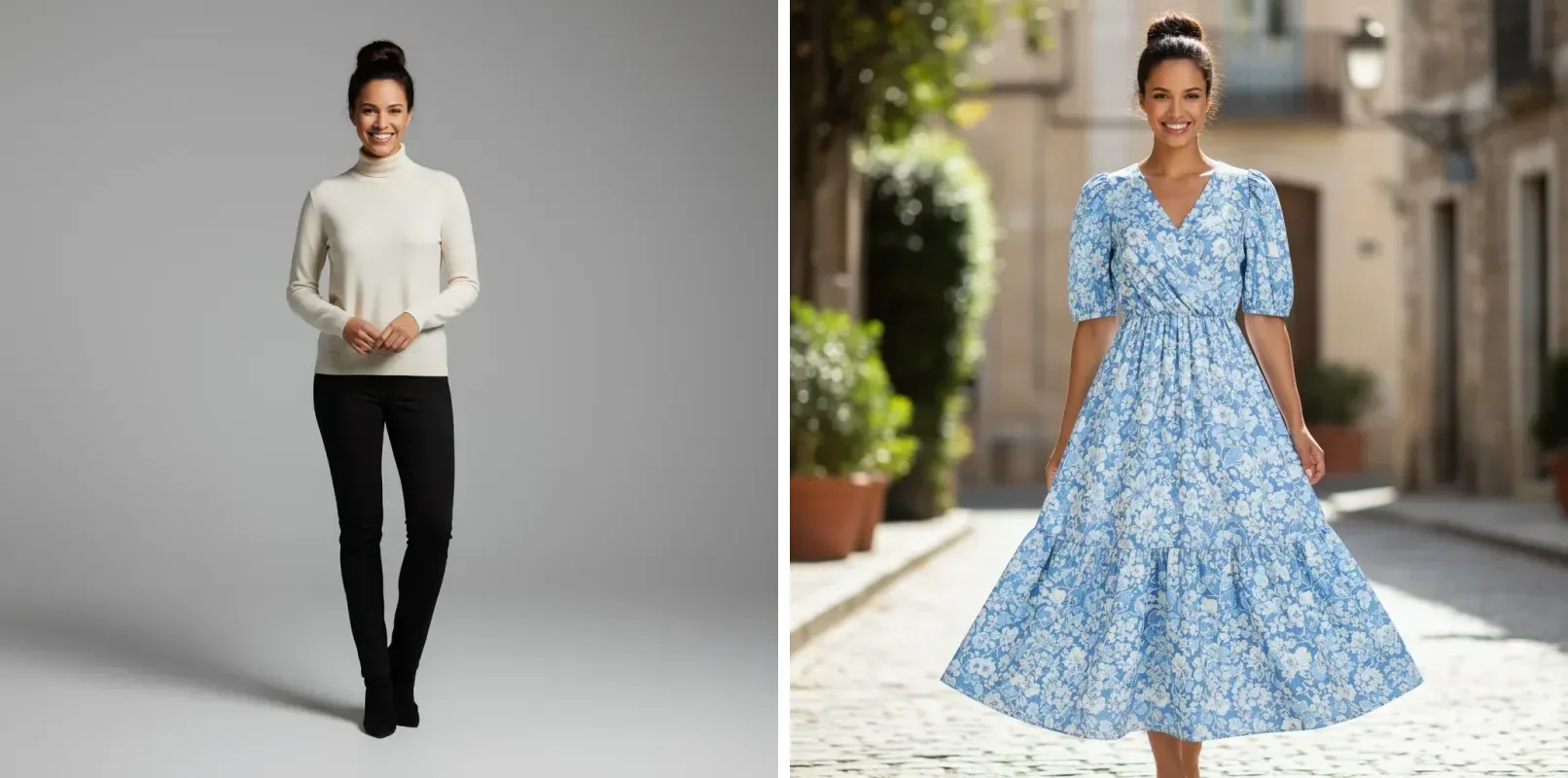
  • Woman in a cream sweater in a gray studio, then the same woman in a blue floral dress on a cobbled street

    Studio test shot to sunny street look

    “Dress her in a blue-and-white floral midi dress with puff sleeves and a tiered skirt, and move her from the gray studio to a sunlit cobbled street in an old stone town. Keep her face, hair bun and smile exactly as they are.”

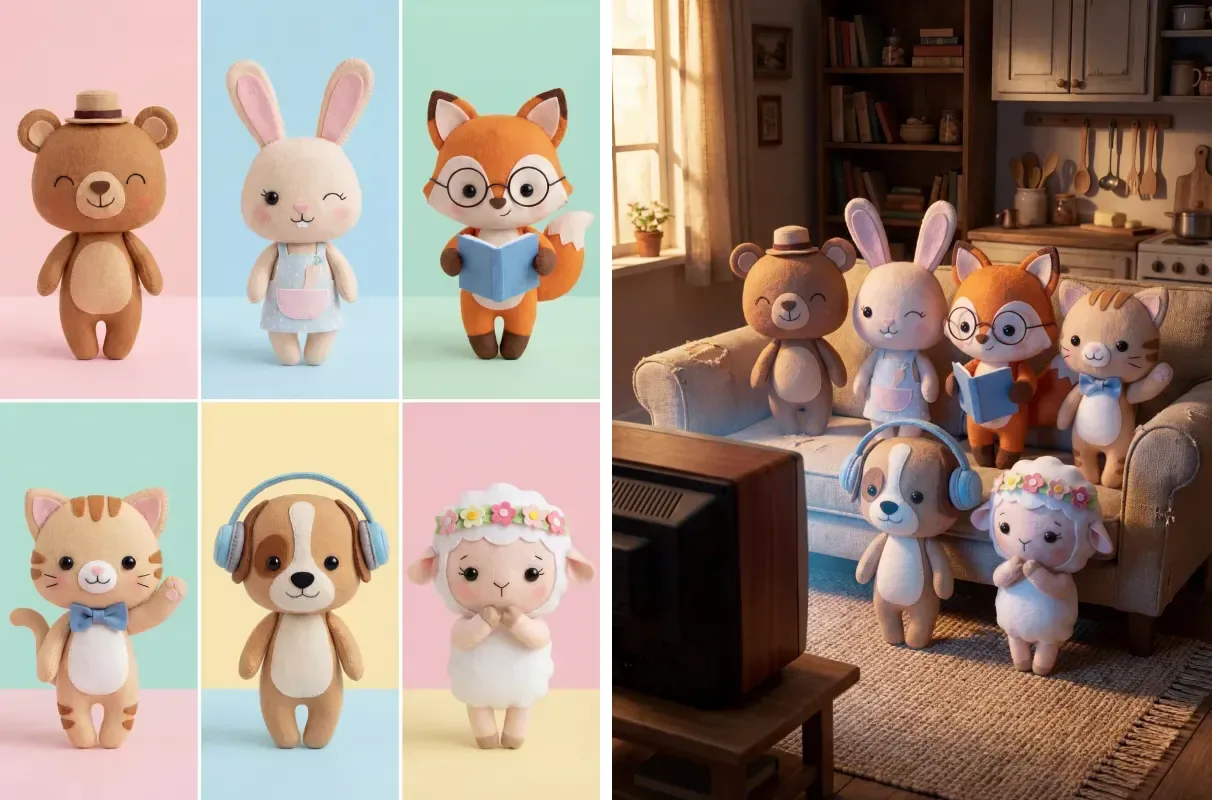
  • Grid of six felt animal toys beside a scene of the same toys sitting on a sofa in a living room

    Six felt toys gathered in one scene

    “Put all six felt animals from this sheet into one scene: sitting together on an old sofa in a warm cottage living room, facing a vintage TV. Keep each toy's accessories, from the bear's hat to the fox's glasses and book.”

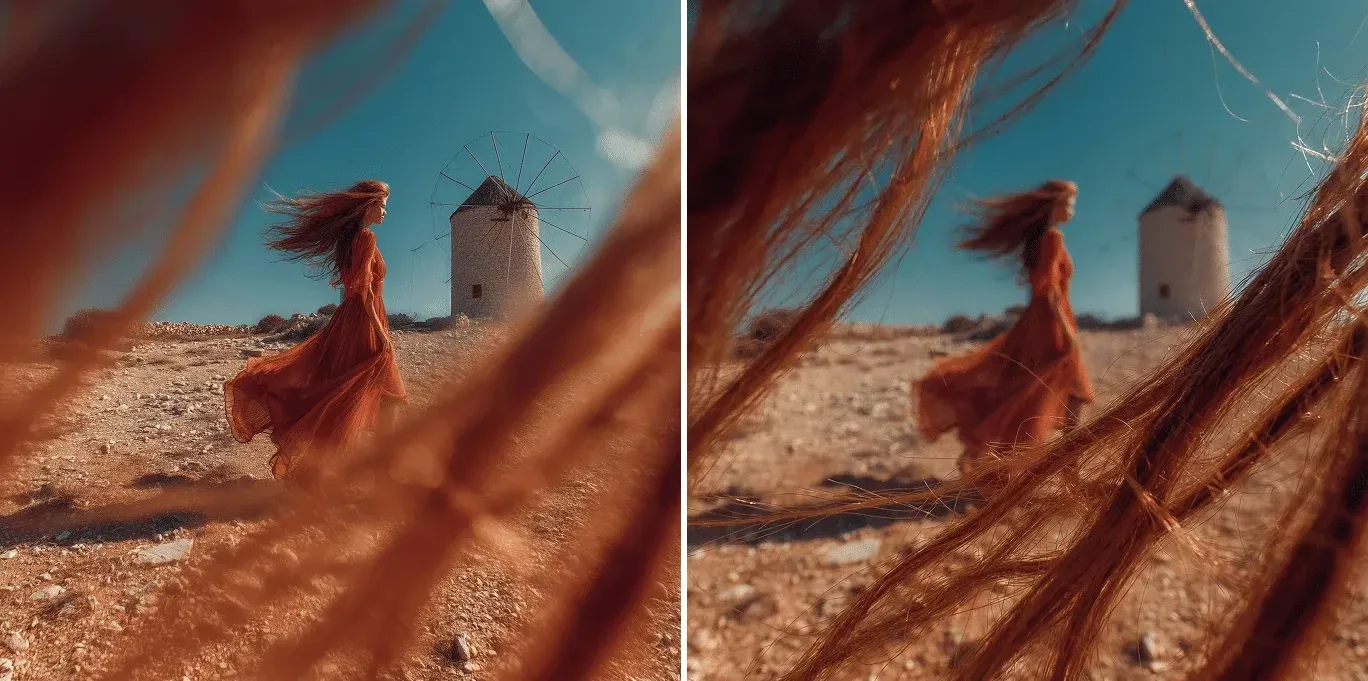
  • Nano Banana Pro focus example: woman in an orange dress near a windmill, refocused so the hair strands in front are sharp

    Focus pulled to the foreground

    “Shift the focus from the woman by the windmill to the windblown strands of hair in the foreground: make the strands crisp and let the windmill and the figure fall into soft blur.”

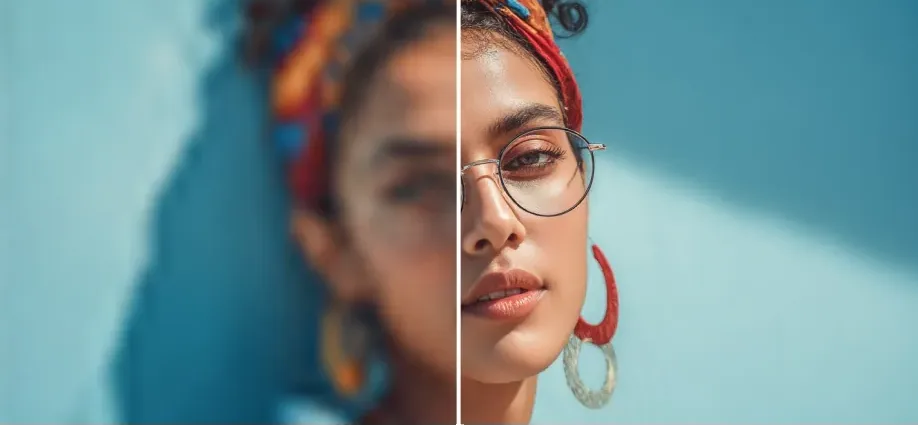
  • Blurry portrait of a woman in a headscarf beside a sharp, detailed version

    Soft portrait brought into focus

    “Sharpen this out-of-focus portrait: bring back the detail in her eyes, glasses, hoop earrings and patterned headscarf, keep her skin texture natural and leave the turquoise wall behind her.”

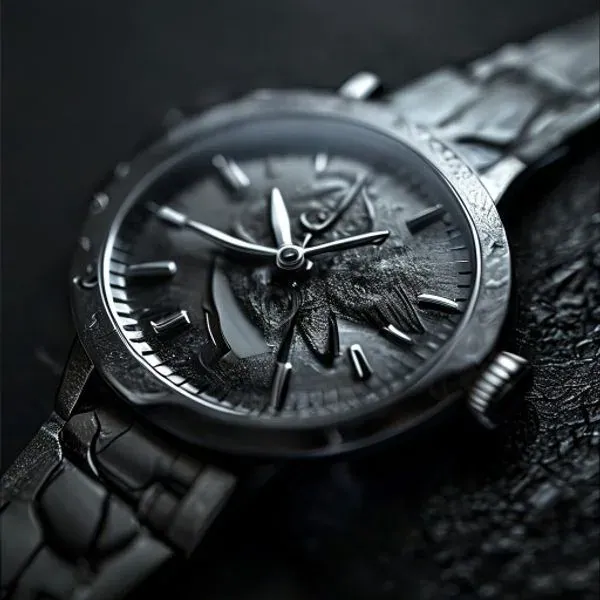
  • Nano Banana Pro macro example: close-up of a silver watch with an engraved case on dark textured stone

    Macro watch detail on dark stone

    “Turn this watch photo into a dramatic macro shot: low raking light across the engraved case and textured dial, a deep black background, and every scratch and grain in sharp focus.”

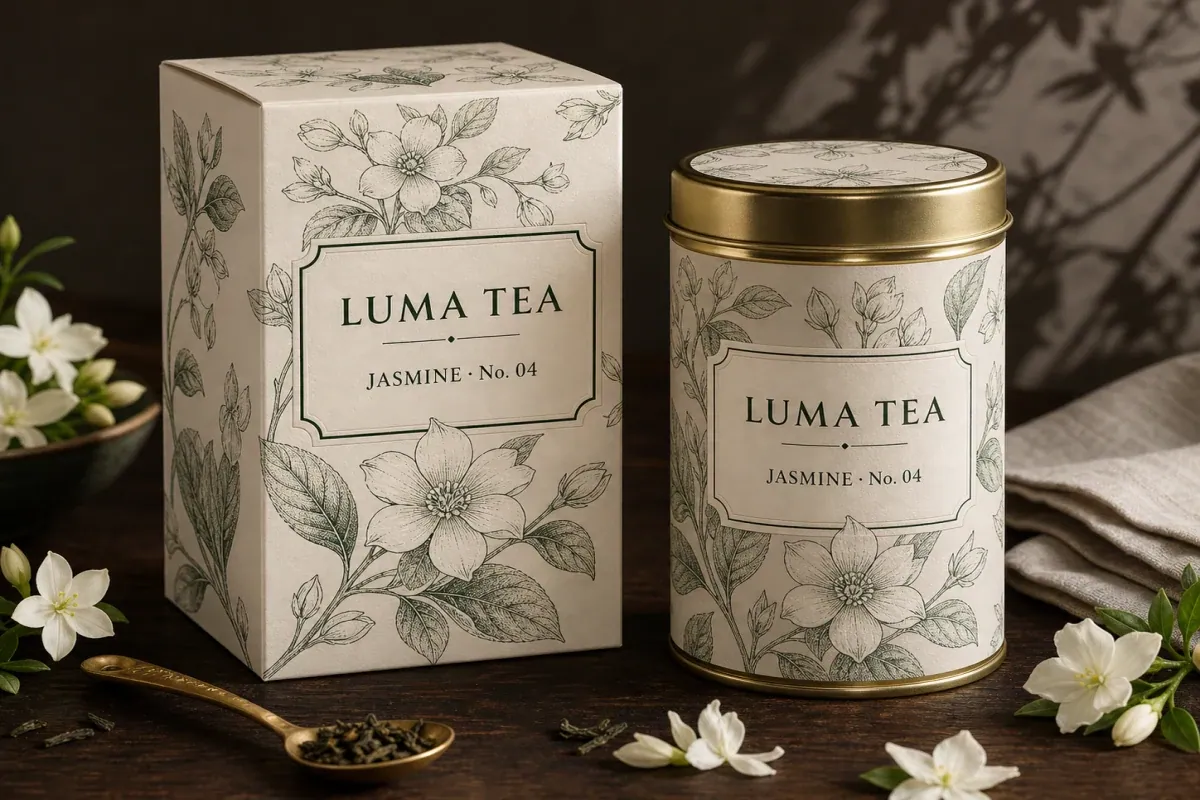
  • Tea box and round tin with botanical line drawings on a wooden table with white jasmine flowers

    Illustrated tea box and tin, styled

    “Style the tea box and tin on a dark wooden table with fresh jasmine flowers, a brass spoon of loose leaves and a linen napkin, lit by soft window light with leaf shadows on the wall. Keep the fine floral line art on the packaging crisp.”

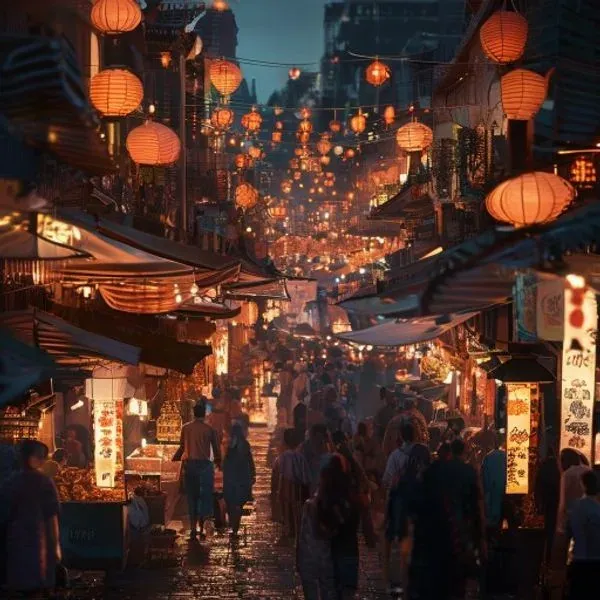
  • Nano Banana Pro crowd example: night market street packed with people under hundreds of glowing orange lanterns

    Crowded lantern street at night

    “Turn this street into a busy night market: rows of glowing paper lanterns overhead, food stalls on both sides and a crowd walking down the middle, with warm light reflecting off the wet stones.”

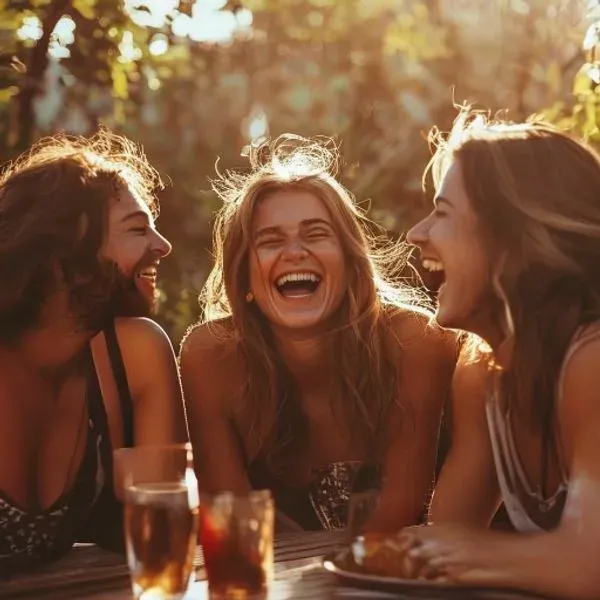
  • Three friends laughing at an outdoor table with the sun shining through their hair

    Backlit friends at golden hour

    “Relight this group photo with low golden-hour sun behind the three friends: warm rim light in their hair, soft flare through the leaves and natural skin tones on every face.”

Example images are for illustration only. Each prompt is a starting point for a similar edit on your own photo.

Where Nano Banana Pro stands out

  • Texture that holds up close

    Woven fabric, engraved metal, paper grain and fur keep their structure in Nano Banana Pro results instead of turning smooth and waxy, which shows when you zoom in on a product or a portrait.

  • Light, focus and camera on request

    Google lists camera angle, focus, color grading and lighting, from day-to-night changes to background blur, as things you can direct in Nano Banana Pro with plain words.

  • Busy scenes stay readable

    In a Nano Banana Pro edit, many people, props and light sources can share a frame without melting into each other. Google says Nano Banana Pro can blend up to 14 images and keep up to five people consistent.

  • Thinks through long prompts

    Nano Banana Pro draws on Gemini 3 Pro's reasoning and real-world knowledge, so a prompt with several connected requests is handled as a plan rather than a loose list.

  • Clean labels inside a scene

    Google highlights high-fidelity text in several languages for Nano Banana Pro, which helps when a product label or a shop sign has to look printed rather than painted.

Nano Banana Pro prompts for detail work

Prompts written the way Nano Banana Pro likes them: they describe light, lens and material, not just the subject. Paste one in and adjust the details to your photo.

  1. 01

    Day to night

    Turn this daytime street photo into night: switch on the shop signs and street lamps, darken the sky to deep blue, add reflections on the pavement, and keep the buildings and cars in place.

  2. 02

    Shallow depth of field

    Give this portrait the look of a fast portrait lens: tack-sharp eyes, a smooth, creamy background blur and gentle falloff toward the shoulders.

  3. 03

    Film-style color grade

    Apply a warm film-style color grade: lifted shadows, golden highlights and slightly muted greens, without changing the people or the composition.

  4. 04

    Ring on black velvet

    Make this ring photo a macro product shot on black velvet, with crisp facets, small sparkles on the stones and a soft reflection underneath.

  5. 05

    Low camera angle

    Show this building from a low camera angle looking up, with converging lines and a clear sky, keeping its windows, materials and colors.

  6. 06

    Knitwear close-up

    Show the knit sweater in close-up so the cable pattern and individual wool fibers are clearly visible, lit softly from the side.

  7. 07

    Steaming ramen for a menu

    Restyle this bowl of ramen for a menu photo: glossy broth, rising steam, sesame seeds on the egg and a dark slate background.

  8. 08

    Festival crowd in an empty square

    Fill the empty square with a lively evening festival: dozens of people, string lights, food stalls and a small stage, all lit by the same warm light.

  9. 09

    Window-light portrait

    Relight this portrait with soft window light from the right, a faint stripe of shadow from the blinds on the wall, and natural skin texture.

Jobs that suit Nano Banana Pro

  • Hero product images

    One standout image for a homepage, an ad or a launch post, where reflections, materials and shadows all have to look right. That single image is where Nano Banana Pro earns its place.

    Product Photo Background
  • Fabric, prints and drape

    Dresses, knits and patterned shirts where the print and the way the cloth falls must read clearly at full size, which is where the texture handling of Nano Banana Pro pays off.

    AI Clothes Changer
  • Portrait polish

    Sharpening a soft portrait, moving the focus or relighting a face with Nano Banana Pro while skin keeps its natural texture.

    Photo Enhancer
  • Cleaner versions of small pictures

    Rebuilding a small or noisy image as a cleaner, more detailed 2K version with Nano Banana Pro before you crop it or place it in a layout.

    AI Image Upscaler
  • Adding people to a busy scene

    Placing extra people or objects into a crowded photo with Nano Banana Pro so they share its light, perspective and scale.

    Add Person to Photo

When Nano Banana Pro is more than the job needs

Nano Banana Pro is the one for detail-heavy single images. For other jobs, one of these EditPic models is usually the smarter choice.

  • Nano Banana 2

    Google

    Switch to Nano Banana 2 for routine fixes and for sets in which one face or product appears again and again. Nano Banana 2 is also the quicker model when you want to test lots of variations.

    About Nano Banana 2
  • GPT Image 2

    OpenAI

    Use GPT Image 2 when the image is mostly words, such as a poster, a menu or a sign with several lines of copy.

    About GPT Image 2
  • Nano Banana

    Google

    Use the original Nano Banana for simple, natural changes such as a new background, an outfit swap or removing an object, where extra detail adds little.

    About Nano Banana
  • Flux

    Black Forest Labs

    Use Flux when an edit must touch only the area you describe and a set of images has to keep one steady style.

    About Flux

Compare all AI models

Tips for sharper Nano Banana Pro results

  • Describe light to Nano Banana Pro the way a photographer would: where it comes from, how hard or soft it is and what color it has.
  • Name the materials you care about, such as brushed steel, linen or glossy glaze, so they keep their surface character.
  • In a busy scene, list the main elements in order of importance and say roughly where each one sits in the frame.
  • Start from the largest, sharpest version of your photo; detail the camera never captured has to be invented, even by Nano Banana Pro.
  • In EditPic, pick 2K for Nano Banana Pro edits that become banners, product pages or anything you will crop; 1K is enough for a quick look.
  • Need many quick variations first? Draft with Nano Banana 2, then rerun the winning prompt with Nano Banana Pro.
  • Work only on images you own or are licensed to change, and keep edits of real people honest.

Getting the most detail from Nano Banana Pro

What Nano Banana Pro adds, how to prompt for it, and what resolution you actually get in EditPic.

What Nano Banana Pro changes compared with Nano Banana 2

Google built Nano Banana Pro on Gemini 3 Pro, its larger reasoning model, and calls it the premium choice for complex visual tasks. The difference shows in requests with many moving parts: six characters arranged in one room, a change of focus that has to respect depth, or packaging whose fine line art must survive restyling. The trade-off is pace. Google positions Nano Banana 2 as the fast option, so Nano Banana Pro is best kept for the images where detail decides the outcome rather than for every quick test.

Prompting Nano Banana Pro for light, focus and texture

Nano Banana Pro rewards specific, visual language. Instead of “make it look professional”, say where the key light sits, whether shadows are hard or soft, which part of the frame should be sharp and how the background should blur. Name surfaces: brushed aluminium, raw linen, wet cobblestones. For a crowded scene, describe the layout from front to back. Keep one main goal per run; if the lighting is right but the color is off, fix the color in a second, short Nano Banana Pro prompt.

Nano Banana Pro: 4K on the model, 1K or 2K in EditPic

Google offers Nano Banana Pro at 1K, 2K and 4K. EditPic does not offer 4K today: every result comes back at 1K or 2K, with a choice of five aspect ratios (one square, two portrait and two landscape). For web pages, online stores, social posts and slides, 2K is comfortably sharp and still leaves room for a modest crop. If a job truly needs a 4K file, for example a large print or a trade-show banner, plan for that before you start rather than expecting it from the editor.

Working from one photo at a time

Nano Banana Pro can combine up to 14 reference images, but EditPic takes one upload per edit. When you want several references in play, place them side by side in a single image first, the way the felt-toy sheet above holds six characters, and tell the prompt what each part is. Then describe the scene you want them in. One clear sheet usually works better than a long verbal description of each item. Keep the sheet tidy: even spacing, plain backgrounds and no overlapping objects make each reference easier for the model to pick out.

A Nano Banana Pro walkthrough: one homepage image for a new vase

Say a small ceramics studio needs one homepage image of a new glazed vase. Start from the sharpest photo you have, with the vase filling much of the frame. Select Nano Banana Pro and describe the set the way a photographer would: a pale linen backdrop, low window light from the left, a soft shadow to the right, and the drips in the glaze picked out by that light. Add a keep line for the shape, the glaze colors and the potter's mark near the base. Choose 2K and a tall 3:4 frame. If the lighting lands but the glaze looks too blue, send one short follow-up about color alone instead of rewriting the whole brief.

Common Nano Banana Pro mistakes

The first is using Nano Banana Pro for every quick test; it is the detail model, and Google positions Nano Banana 2 as the faster option for trying ideas. The second is vague mood words such as 'make it premium', which give the model nothing concrete to render, so name the light, the lens look and the surfaces instead. The third is starting from a tiny or heavily compressed file and expecting texture the camera never captured. The fourth is expecting a 4K download: Nano Banana Pro supports 4K as a model, but EditPic returns its results at 1K or 2K. And when an image is mostly words, GPT Image 2 is the better fit.

Nano Banana Pro FAQ

  1. Is Nano Banana Pro free on EditPic?

    Signing up costs nothing, and each Nano Banana Pro edit is paid for with credits. The credit cost depends on the model, and bonus credits for new accounts depend on the offer running at the time.

  2. What resolution does Nano Banana Pro support?

    As a model, Nano Banana Pro renders at 1K, 2K or 4K. EditPic currently outputs Nano Banana Pro results at 1K or 2K only, so a 4K file is not available from the editor.

  3. Nano Banana Pro vs Nano Banana 2: what is the difference?

    Nano Banana Pro is built on Gemini 3 Pro and aims at detail, lighting control and complex scenes. Nano Banana 2 comes from Google's Flash line and is tuned for speed and for keeping a subject consistent across a series. Choose by the job, not by the name.

  4. Can Nano Banana Pro change lighting and focus?

    Yes. For Nano Banana Pro, Google names camera angle, focus, color grading and lighting, including day-to-night changes and background blur, as controls you can describe. The windmill and portrait examples on this page show Nano Banana Pro focus changes.

  5. Can Nano Banana Pro render text?

    Google says Nano Banana Pro renders high-fidelity text in multiple languages, which works well for labels and signs inside a photo. When the whole image is a text layout, such as a poster or a menu, GPT Image 2 is the better fit in EditPic.

  6. How many images can Nano Banana Pro combine?

    According to Google, Nano Banana Pro can combine up to 14 images, including up to five people. In EditPic you upload one photo per edit, so put the references side by side in one image before uploading.

  7. How do I use Nano Banana Pro online?

    Open the editor at the top of this page, where Nano Banana Pro is preselected. Add a JPG, PNG or WebP file (20 MB max), spell out the light, focus or detail you are after, choose 2K for the sharpest result and start the edit.

  8. Is Nano Banana Pro slower than Nano Banana 2?

    Google positions Nano Banana 2 as the fast option and Nano Banana Pro as the premium choice for complex visual tasks, without timing figures we can quote. Treat Nano Banana Pro as the model for the final, detail-heavy image, and Nano Banana 2 for quick rounds of testing.

  9. Can Nano Banana Pro sharpen a blurry photo?

    Nano Banana Pro can rebuild detail in a soft or out-of-focus picture, as the portrait example above shows, while keeping skin texture natural. The result depends on what the original captured: a badly blurred face may come back cleaner but not identical. Choose 2K and name the details that matter, such as eyes, glasses or fabric.

  10. Is Nano Banana Pro good for product photography?

    Yes, especially for one hero image where reflections, materials and shadows have to look right: jewelry, watches, glassware or packaging with fine line art. For a whole set of matching listing photos, Nano Banana 2 is usually the quicker route.

  11. Does Nano Banana Pro add a watermark?

    Google says Nano Banana Pro images carry SynthID, an invisible digital watermark that marks them as AI-generated; you will not see it on the picture. We don’t add our own watermark in EditPic.

Run Nano Banana Pro on your photo

Upload a picture, describe the light and detail you are after, and download a 1K or 2K Nano Banana Pro result.